Pertama-tama Anda harus masuk ke menu
Appearance > Customize > Theme Settings – WooCommerce > WC – Shop Page,
ada beberapa bagian settings seperti :
-
Site Header
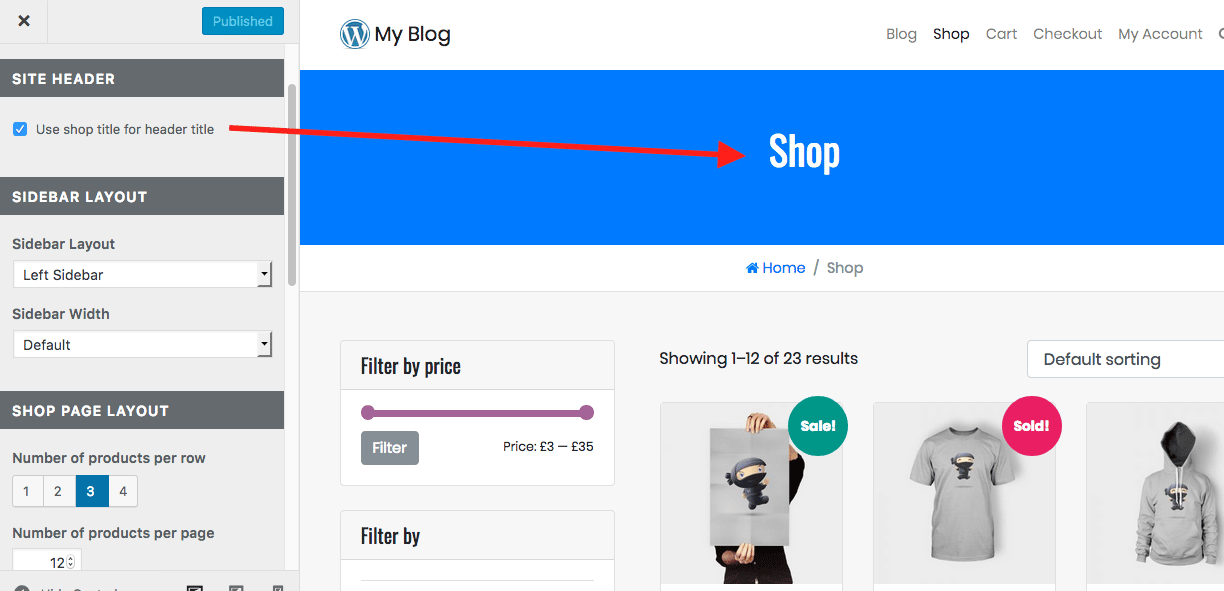
– Use shop title for header title
Pilihan untuk menampilkan judul halaman di area Site Header. -
Sidebar Layout

– Sidebar Layout
Pilihan untuk layout dari sidebar: No Sidebar, Right Sidebar, Left Sidebar.
– Sidebar Width
Pilihan untuk lebar sidebar: Default, 3/12 Grid, 4/12 Grid, 5/12 Grid, 6/12 Grid.
– Content Width
Pilihan untuk lebar content: Default, 12/12 Grid, 11/12 Grid, 10/12 Grid, 9/12 Grid, 8/12 Grid, 7/12
Grid, 6/12 Grid. -
Shop Page Layout
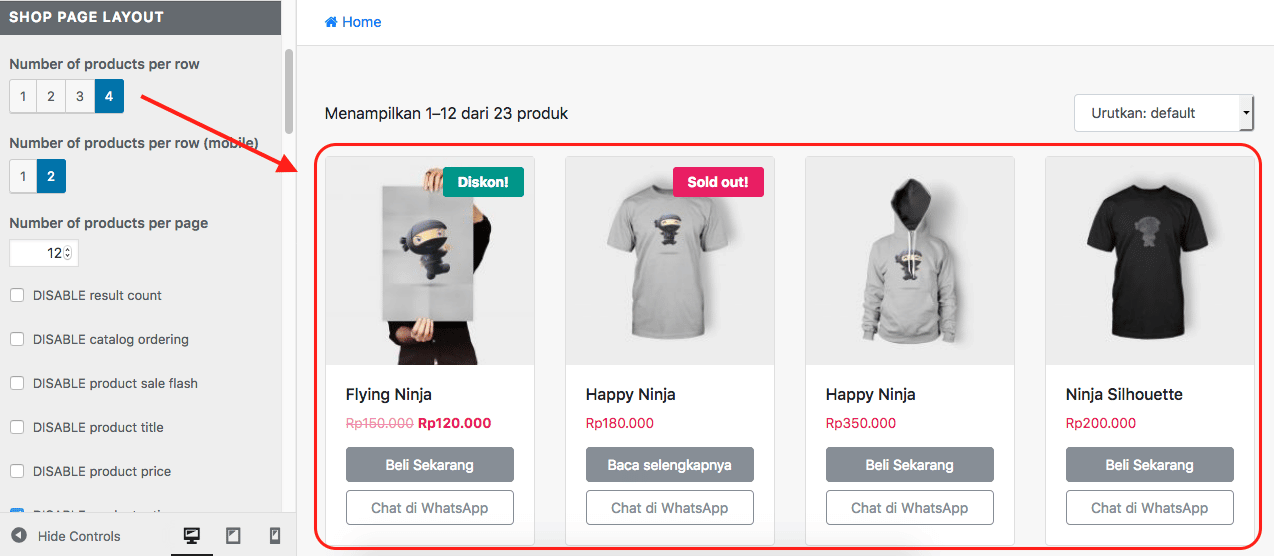
– DISABLE result count
Sembunyikan informasi jumlah produk.
– DISABLE catalog ordering
Sembunyikan pilihan order produk.
– Number of products per row
Isi dengan jumlah kolom produk yang akan ditampilkan.
– Number of products per row (mobile)
For mobile only, when device viewport width <= 480px.
– Number of products per page
Isi dengan jumlah produk yang akan di tampilkan setiap halamannya. -
Shop Page Product Image
– DISABLE product image link
Sembunyikan URL pada gambar produk. -
Shop Page Elements
– DISABLE product sale flash
Sembunyikan prodyk sale flash badge.
– DISABLE product title
Sembunyikan judul produk.
– TRUNCATE product title (one line only)
Tampilkan judul produk hanya satu baris.
– DISABLE product price
Sembunyikan harga produk.
– DISABLE product rating
Sembunyikan rating produk.
– Product Detail Alignment
Pilih posisi detail produk: Rata Kiri, Rata Tengah, Rata Kanan.
– Product Box Background
Pilih warna background untuk box produk.
– Product Box Border
Pilih warna border untuk box produk.
– Product Title Color
Pilih warna judul produk.
– Product Price Color
Pilih warna harga produk. -
“Add To Cart” Button
– DISABLE “add to cart” button
Sembunyikan Add to Cart button.
– Button Type
Pilih tipe button: Link To Product Page, Click To AddToCart.
– Button Style
Pilih style button: Inline, Full Width.
– Button Text: Simple Product
Ganti text pada Add to Cart button untuk jenis produk simple.
– Button Text: Variable Product
Ganti text pada Add to Cart button untuk jenis produk variasi.
– Button Text: OutOfStock Product
Ganti text pada Add to Cart button saat stok produk telah habis.
– Font Size
Pilih ukuran text dari WhatsApp chat button.
– Background Color
Pilih warna background dari Add to Cart button.
– Border Color
Pilih warna border dari Add to Cart button.
– Text Color
Pilih warna text dari Add to Cart button.
– Background Color (Hover)
Pilih warna background dari Add to Cart button saat di hover.
– Border Color (Hover)
Pilih warna border dari Add to Cart button saat di hover.
– Text Color (Hover)
Pilih warna text dari Add to Cart button saat di hover. -
WhatsApp Chat Button
– ENABLE WhatsApp Chat Button
Aktifkan WhatsApp chat button di halaman shop.
– Button Style
Pilih style button: Inline, Full Width.
– Button Text
Ganti Text WhatsApp chat button.
– Font Size
Pilih ukuran text dari WhatsApp chat button.
– Background Color
Pilih warna background dari WhatsApp chat button.
– Border Color
Pilih warna border dari WhatsApp chat button.
– Text Color
Pilih warna text dari WhatsApp chat button.
– Background Color (Hover)
Pilih warna background dari WhatsApp chat button saat di hover.
– Border Color (Hover)
Pilih warna border dari WhatsApp chat button saat di hover.
– Text Color (Hover)
Pilih warna text dari WhatsApp chat button saat di hover. -
Pagination Style
Sesuaikan pagination style.


